Spinning Cube
Spinning Cube extends the first graphics workload into three dimensions. It reuses vertex input and a graphics pipeline, then adds indexed geometry, model-view-projection constants, back-face culling, a depth attachment, animation, and size-dependent resource handling.
The guide focuses on the Zenith.NET objects and their lifetime. Matrix construction uses System.Numerics; a full derivation of perspective projection is outside the workload boundary.
Result
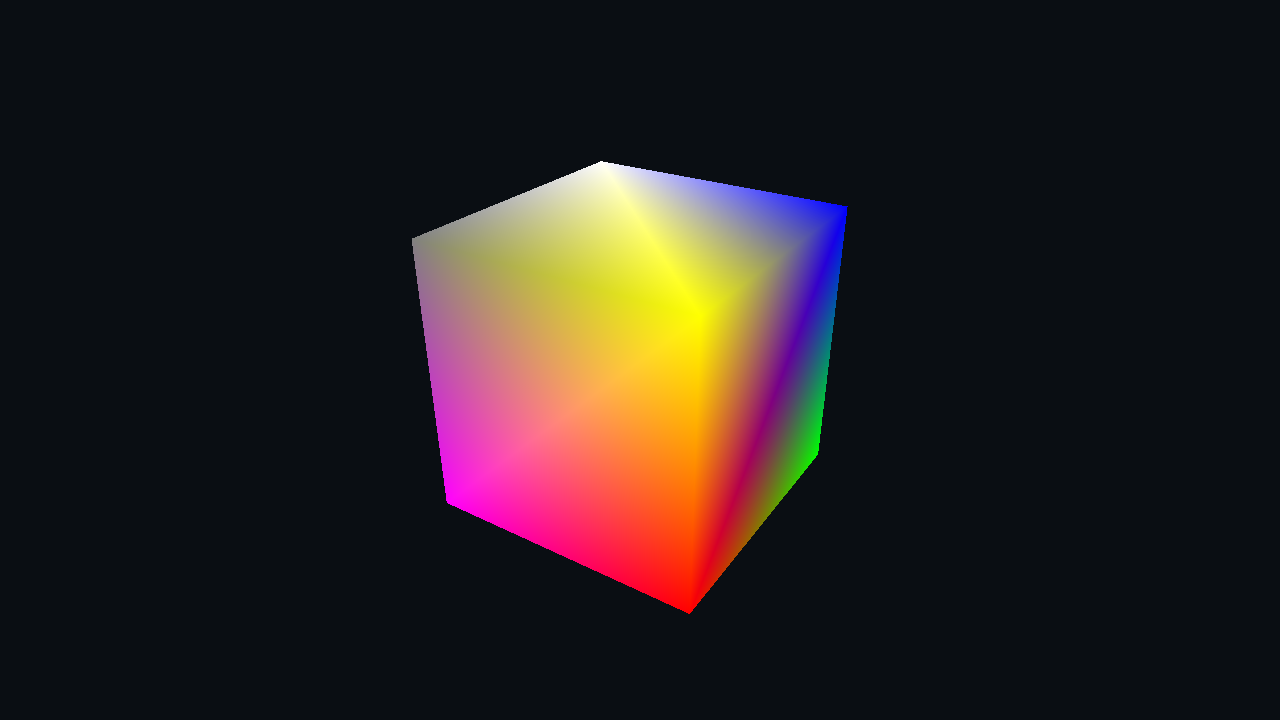
The cube rotates around two axes. Back faces are culled, and the depth attachment ensures that nearer fragments hide farther surfaces.
Frame overview
Initialization uploads eight shared vertices and 36 indices, creates a constant buffer, and builds a depth-enabled pipeline. Per frame:
flowchart LR
    A[Update MVP constants] --> B{Depth texture exists?}
    B -- No --> C[Create and transition depth texture]
    B -- Yes --> D[Begin color and depth render pass]
    C --> D
    D --> E[Bind pipeline and buffers]
    E --> F[DrawIndexed 36]
    F --> G[End render pass]
On resize, the renderer disposes only the depth texture. The next frame recreates it with the new framebuffer dimensions.
Resource map
| Resource | Usage | Lifetime |
|---|---|---|
| Vertex buffer | Eight cube positions and colors | Renderer |
| Index buffer | Twelve triangles sharing those vertices | Renderer |
| Constant buffer | Model, view, and projection matrices | Renderer; updated each frame |
| Graphics pipeline | Depth-tested indexed drawing | Renderer |
| Depth texture | D32FloatS8UInt attachment |
Recreated after resize |
| Swap-chain drawable | Color attachment | Host-owned |
The depth format appears in both the pipeline attachment declaration and the texture description. Those values must agree.
Geometry and indexed drawing
Eight vertices describe the unique corners of the cube. The index buffer selects them to build six faces, two triangles per face:
uint[] indices =
[
    0, 1, 2, 0, 2, 3,
    5, 4, 7, 5, 7, 6,
    4, 0, 3, 4, 3, 7,
    1, 5, 6, 1, 6, 2,
    3, 2, 6, 3, 6, 7,
    4, 5, 1, 4, 1, 0
];

vertexBuffer = App.LoadBuffer(vertices, BufferUsages.Vertex);
indexBuffer = App.LoadBuffer(indices, BufferUsages.Index);
Using indices avoids duplicating a complete position-and-color record for every triangle corner. The element type is uint, so the render method binds it as IndexFormat.UInt32.
Data contract
The Slang constant buffer contains three consecutive matrices:
struct Constants
{
    float4x4 Model;

    float4x4 View;

    float4x4 Projection;
};

ConstantBuffer<Constants> constants;
The C# structure fixes each 64-byte matrix at the corresponding offset:
[StructLayout(LayoutKind.Explicit, Size = 192)]
file struct Constants
{
    [FieldOffset(0)]
    public Matrix4x4 Model;

    [FieldOffset(64)]
    public Matrix4x4 View;

    [FieldOffset(128)]
    public Matrix4x4 Projection;
}
| Offset | C# | Slang | Size |
|---|---|---|---|
| 0 | Matrix4x4 Model |
float4x4 Model |
64 bytes |
| 64 | Matrix4x4 View |
float4x4 View |
64 bytes |
| 128 | Matrix4x4 Projection |
float4x4 Projection |
64 bytes |
Explicit offsets keep the shared binary contract visible. The total structure size is 192 bytes.
Transform vertices
The vertex shader composes the three matrices and transforms each position:
[shader("vertex")]
FSInput VSMain(VSInput input)
{
    float4x4 modelView = mul(constants.Model, constants.View);
    float4x4 mvp = mul(modelView, constants.Projection);

    FSInput output;
    output.Position = mul(float4(input.Position, 1.0), mvp);
    output.Color = input.Color;

    return output;
}
System.Numerics.Matrix4x4 and this shader use the same row-vector order: model, then view, then projection. The fragment shader simply returns the interpolated vertex color.
Enable depth and culling
The graphics pipeline adds a depth format and enables both back-face culling and depth read/write:
pipeline = App.Context.CreateGraphicsPipeline(new()
{
    VertexShader = vertexShader,
    FragmentShader = fragmentShader,
    InputLayouts = [inputLayout],
    PrimitiveTopology = PrimitiveTopology.TriangleList,
    AttachmentFormats = new()
    {
        ColorFormats = [App.ColorFormat],
        DepthStencilFormat = PixelFormat.D32FloatS8UInt,
        SampleCount = SampleCount.Count1
    },
    RenderState = new()
    {
        Rasterizer = RasterizerState.CullBack(),
        DepthStencil = DepthStencilState.DepthReadWrite(),
        Blend = BlendState.Opaque()
    }
});
Back-face culling removes triangles whose winding faces away from the camera. Depth testing compares overlapping fragments, while depth writes preserve the nearest accepted value for later triangles.
Update transformation constants
Update advances a frame-rate-independent angle and constructs the three matrices:
rotationAngle += (float)deltaTime;

Constants constants = new()
{
    Model = Matrix4x4.CreateRotationY(rotationAngle) * Matrix4x4.CreateRotationX(rotationAngle * 0.5f),
    View = Matrix4x4.CreateLookAt(new(0.0f, 0.0f, 3.0f), Vector3.Zero, Vector3.UnitY),
    Projection = Matrix4x4.CreatePerspectiveFieldOfView(float.DegreesToRadians(45.0f), (float)App.Width / App.Height, 0.1f, 100.0f)
};
The framebuffer aspect ratio keeps the projection proportional after a resize. Upload exactly one Constants value:
constantBuffer.Upload(0, new()
{
    Pointer = (nint)(&constants),
    SizeInBytes = (uint)sizeof(Constants)
});
The teaching host waits for each submitted frame, so overwriting this single constant buffer does not race a previous frame. A multi-frame application needs separate per-frame storage or equivalent synchronization.
Create the depth attachment
The depth texture is created lazily after the window has a valid framebuffer size:
if (depthTexture is null)
{
    depthTexture = App.Context.CreateTexture(TextureDesc.DepthStencilAttachment(PixelFormat.D32FloatS8UInt, App.Width, App.Height, SampleCount.Count1));

    commandBuffer.Transition(depthTexture, default, TextureLayout.Undefined, TextureLayout.DepthStencilAttachment);
}
The first transition establishes DepthStencilAttachment layout. The texture remains in that layout while reused by later frames.
Record the frame
Begin a render pass with both color and depth attachments, bind all inputs, and issue an indexed draw:
commandBuffer.BeginRenderPass([ColorAttachment.Clear(drawable, new(0.04f, 0.055f, 0.075f, 1.0f))], DepthStencilAttachment.Clear(depthTexture, 1.0f, 0));

commandBuffer.SetPipeline(pipeline);
commandBuffer.SetVertexBuffer(vertexBuffer, 0, 0);
commandBuffer.SetIndexBuffer(indexBuffer, 0, IndexFormat.UInt32);
commandBuffer.SetConstantBuffer(constantBuffer, 0);

commandBuffer.DrawIndexed(36, 1, 0, 0, 0);

commandBuffer.EndRenderPass();
Depth is cleared to 1.0 for each frame. DrawIndexed consumes all 36 indices for one instance, starting at index and vertex offsets zero.
Resize and lifetime
The depth attachment dimensions must match the drawable. Dispose it on resize and recreate it during the next render:
public void Resize(uint width, uint height)
{
    depthTexture?.Dispose();
    depthTexture = null;
}
Release the optional depth texture first, then the pipeline and its input resources:
public void Dispose()
{
    depthTexture?.Dispose();

    pipeline.Dispose();
    constantBuffer.Dispose();
    indexBuffer.Dispose();
    vertexBuffer.Dispose();
}
Inspect the result
Run the host and select Spinning Cube. Confirm that:
- the cube rotates smoothly and hidden surfaces do not bleed through;
- resizing changes the projection without stretching the cube;
- the depth texture is recreated after resize;
- the validation layer reports no attachment-format or layout errors.
If faces disappear unexpectedly, inspect index winding and culling. If distant faces draw over near faces, confirm that the pipeline enables depth read/write and that a depth attachment is supplied to the render pass.
Explore further
- Replace
CullBackwithCullNoneand compare the result. - Disable depth testing while leaving the depth attachment present.
- Change the near and far projection planes and observe depth precision at different distances.
- Give each face its own vertices and colors to see the tradeoff between shared indices and per-face attributes.
Complete source
Continue with Indirect Drawing to reuse this depth-tested cube for 25 instances driven by one indirect argument record, or branch to Compute Shader to produce an image without rasterized geometry.