Compute Shader
Compute Shader produces an image without a render pass. A compute pipeline reads a sampled texture, converts one pixel per thread to grayscale, and writes a storage texture. The host then presents that output with its shared fullscreen-triangle pipeline.
The grayscale conversion makes the result easy to inspect, but the guide focuses on Zenith.NET resource handles, compute dispatch, and texture layout transitions rather than color-science derivations.
Result
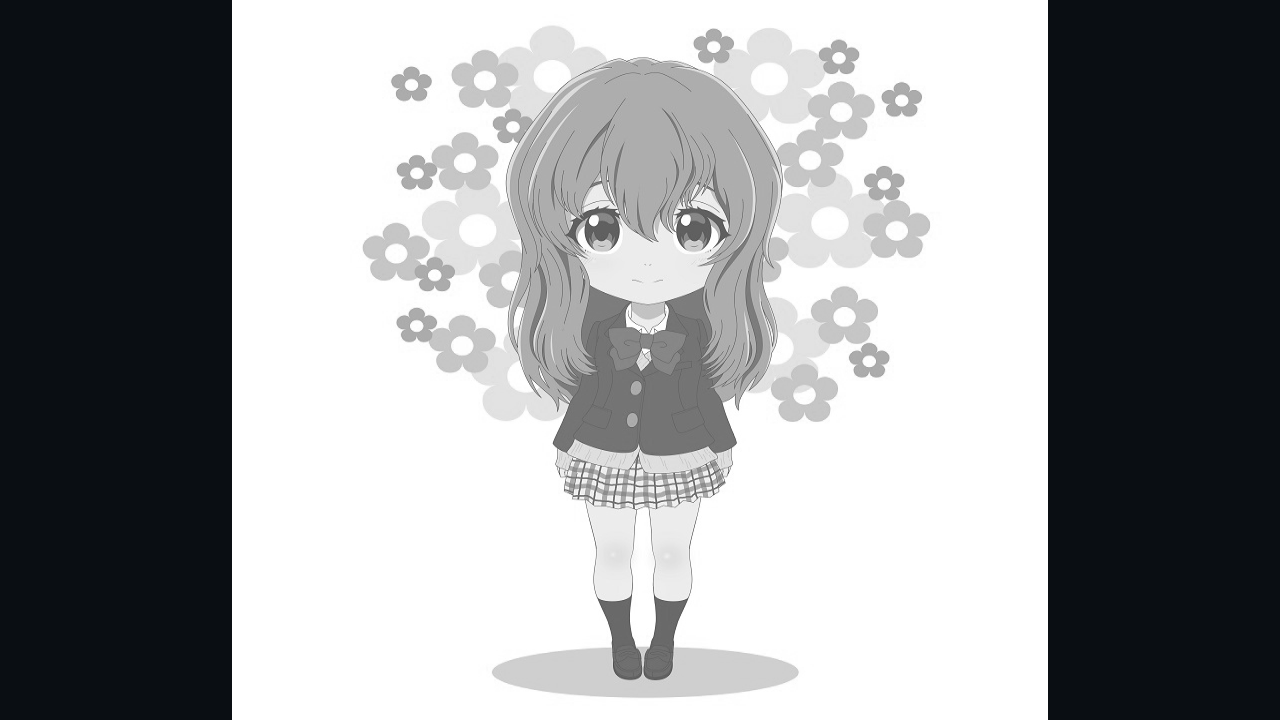
The source image is processed once at its original dimensions. It is displayed at those dimensions while the framebuffer is at least as large as the image. Threads outside the image bounds are discarded when the dimensions are not exact multiples of the thread-group size.
Frame overview
flowchart LR
    A{Already processed?} -- No --> B[Output to Storage]
    B --> C[Bind compute pipeline and constants]
    C --> D[Dispatch thread groups]
    D --> E[Output to Sampled]
    E --> F[Present texture]
    A -- Yes --> F
The output is static, so the compute pass runs only during the first frame. Later frames reuse the sampled result.
Resource map
| Resource | Usage | Access |
|---|---|---|
| Input texture | Sampled |
Compute shader reads pixels |
| Output texture | Storage and Sampled |
Compute shader writes; presenter reads |
| Constant buffer | Constant |
Width, height, and two resource handles |
| Compute shader | CSMain |
One thread per output pixel |
| Compute pipeline | Compute dispatch | Binds the shader executable |
The output texture needs both usages at creation time because it changes roles after the dispatch.
Load the input texture
Place an image at Assets/Textures/shoko.png. The project configuration from Project Setup copies it next to the executable. The ImageSharp extension loads it into a sampled Zenith.NET texture:
inputTexture = App.LoadTexture("shoko.png", false);
The final argument disables mipmap generation because this workload reads exact source pixels with Texture2D.Load.
App.LoadTexture completes the upload before returning and leaves the loaded mip in Sampled layout. The compute pass therefore needs no input-texture transition; only the output texture changes layout during Render.
Create the output texture
Create a floating-point texture with the same dimensions as the source:
outputTexture = App.Context.CreateTexture(new()
{
    Type = TextureType.Texture2D,
    Format = PixelFormat.R32G32B32A32Float,
    Width = inputTexture.Desc.Width,
    Height = inputTexture.Desc.Height,
    Depth = 1,
    MipLevels = 1,
    ArrayLayers = 1,
    SampleCount = SampleCount.Count1,
    Usages = TextureUsages.Sampled | TextureUsages.Storage
});
R32G32B32A32Float matches the shader's writable float4 element type. Storage permits writes during compute; Sampled permits reads by TexturePresenter afterward.
Data contract
The constant buffer passes image dimensions and descriptor handles:
struct Constants
{
    uint Width;

    uint Height;

    DescriptorHandle<Texture2D> Input;

    DescriptorHandle<RWTexture2D<float4>> Output;
};

ConstantBuffer<Constants> constants;
The declaration after the structure binds that contract as the constant-buffer view read by CSMain.
The C# layout matches the two four-byte integers followed by two eight-byte handles:
[StructLayout(LayoutKind.Explicit, Size = 256)]
file struct Constants
{
    [FieldOffset(0)]
    public uint Width;

    [FieldOffset(4)]
    public uint Height;

    [FieldOffset(8)]
    public ResourceHandle Input;

    [FieldOffset(16)]
    public ResourceHandle Output;
}
| Offset | C# value | Slang view |
|---|---|---|
| 0 | inputTexture.Desc.Width |
uint Width |
| 4 | inputTexture.Desc.Height |
uint Height |
| 8 | inputTexture.SampledHandle |
DescriptorHandle<Texture2D> |
| 16 | outputTexture.StorageHandle |
DescriptorHandle<RWTexture2D<float4>> |
The structure reserves a 256-byte constant-buffer allocation while its semantic fields occupy the leading bytes. The offsets, rather than the C# field names, define the shared binary contract.
Initialize and upload one value:
Constants constants = new()
{
    Width = inputTexture.Desc.Width,
    Height = inputTexture.Desc.Height,
    Input = inputTexture.SampledHandle,
    Output = outputTexture.StorageHandle
};

constantBuffer = App.LoadBuffer([constants], BufferUsages.Constant);
Shader interface
The shader declares a \(16 \times 16\) thread group:
[shader("compute")]
[numthreads(16, 16, 1)]
void CSMain(uint3 dispatchThreadID: SV_DispatchThreadID)
{
    uint2 pixel = dispatchThreadID.xy;

    if (pixel.x >= constants.Width || pixel.y >= constants.Height)
    {
        return;
    }

    float4 color = constants.Input.Load(int3(pixel, 0));
    float3 linear = pow(color.rgb, 2.2);
    float grayscale = dot(linear, float3(0.2126, 0.7152, 0.0722));
    grayscale = pow(grayscale, 1.0 / 2.2);

    constants.Output[pixel] = float4(grayscale, grayscale, grayscale, color.a);
}
SV_DispatchThreadID is the global thread coordinate across all dispatched groups. The bounds check is essential because group counts round up to cover partial groups at the image edges.
The middle lines approximate conversion to linear light, calculate luminance, and convert back for display. That effect can be replaced without changing the pipeline or resource flow; the important interface is one sampled read and one storage write at the same pixel coordinate.
Create the compute pipeline
Compile the compute entry point and create its pipeline:
using Shader computeShader = App.LoadShader("ComputeShader.slang", "CSMain");

computePipeline = App.Context.CreateComputePipeline(new() { ComputeShader = computeShader });
A compute pipeline has no attachment formats or rasterizer state. It executes outside a render pass.
Dispatch the workload
Before the first dispatch, transition the output from its undefined initial contents into writable storage layout:
commandBuffer.Transition(outputTexture, default, TextureLayout.Undefined, TextureLayout.Storage);

commandBuffer.SetPipeline(computePipeline);
commandBuffer.SetConstantBuffer(constantBuffer, 0);
commandBuffer.Dispatch((inputTexture.Desc.Width + ThreadGroupSize - 1) / ThreadGroupSize, (inputTexture.Desc.Height + ThreadGroupSize - 1) / ThreadGroupSize, 1);
For a dimension \(D\) and group size \(G\), integer ceiling division is:
After all storage writes, transition the texture for sampled reads:
commandBuffer.Transition(outputTexture, default, TextureLayout.Storage, TextureLayout.Sampled);

processed = true;
The command buffer preserves this order: transition, dispatch, then transition. The presenter consumes the texture only after it reaches Sampled layout.
Present the output
Every frame, including the first, hands the sampled result to the shared presenter:
App.PresentTexture(commandBuffer, drawable, outputTexture, false);
Passing false preserves the texture's original size and centers it when the framebuffer is at least as large in both dimensions. In a smaller framebuffer, the presenter clamps each viewport dimension to the available size. The presenter records the graphics render pass that writes the swap-chain drawable.
Lifetime
This image does not depend on the framebuffer size, so Resize is empty. Dispose each renderer-owned resource after the final submitted frame has completed:
public void Dispose()
{
    computePipeline.Dispose();
    constantBuffer.Dispose();
    outputTexture.Dispose();
    inputTexture.Dispose();
}
Inspect the result
Run the host and select Compute Shader. Confirm that:
- the complete source image appears in grayscale;
- no unprocessed strip appears along the right or bottom edge;
- resizing to a framebuffer at least as large as the image preserves its original display size;
- validation reports no storage/sampled usage or layout errors.
An unprocessed edge usually indicates floor division or a missing bounds check. A blank result often indicates an incorrect descriptor handle or a missing Storage to Sampled transition.
Explore further
- Replace the grayscale calculation with
constants.Output[pixel] = colorto verify a direct copy. - Invert
color.rgbwhile preserving alpha. - Change the declared thread-group size and update the C#
ThreadGroupSizeconstant to match. - Set
fitToWindowtotruewhen presenting and compare the viewport behavior.
Complete source

Continue with Ray Tracing to reuse the compute-output flow for an image regenerated from inline ray queries every frame.